 Home
 Back
 Forward
 Print
Export to Outlook©– Viewing your Contacts
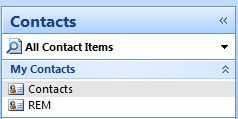
1. To view your Contacts in Outlook© go to Contacts within Outlook©, you will notice there are
two groups under Contacts, one is Contacts within Outlook© the other is REM.
2. In My Contacts in Outlook© all your saved Outlook© Contacts are under “Contacts” all your
exported Contacts from Real Estate Manager are in the REM folder. The contents of the REM folder are replaced every time you export your Contacts from Real Estate Manager to Outlook©. Any new details updated in Real Estate Manager will be updated in the REM contacts folder in Outlook©.
3. You can drag a contact from the REM Contacts within Outlook© to your Contacts in Outlook©.
Only the contents of the Contacts REM folder within Outlook© will be replaced each time you use the Export to Outlook function.
For example: If you drag your Contacts from REM Contacts within Outlook© to your Outlook© Contacts next time you export your Contacts to Outlook© you will have another record for that contact within your REM contact within Outlook©.