 Home
 Back
 Forward
 Print
Outlook Email Templates
Using Outlook Email Templates
Microsoft Outlook has the ability to create email messages using a prewritten email as a template. When opening a saved email template file, a new email is created that is a direct copy of the template. Changes made to this email do not affect the original template.
To use this feature, you firstly write an email as you would normally. You do not specify any recipients. Then you save the email as an Outlook Template (.oft) file from the main menu button of the email as shown here.
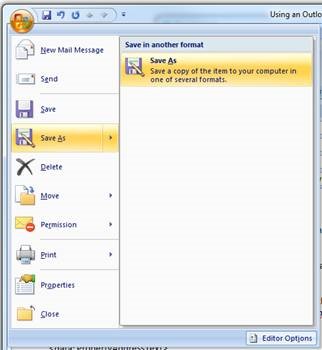
Select "Outlook Template (*.oft)" in the 'Save as type' box in the Save As dialog, then browse to your desired save location. Then click Save.
Note: To edit a saved template, you must repeat this process. Template files cannot be edited directly - they can only be saved by overwriting it with an email being saved as a template file.
Email templates support rich text and HTML just like normal emails, so you can apply your own formatting. Attachments can also be saved with email templates. This means you can send other documents, such as company newsletters or marketing material, along with the report being sent.
Email templates also support text data substitution in the Subject and the Body. This feature is specific for use in the Real Estate Manager software.
The syntax for a data field placeholders is <data:FieldName> where FieldName is the name of a data field.
Typical data field placeholders are:
<data: Address>
<data: SupplierName>
<data: OnSiteContactName>
The data fields available depends on the type of email being sent.
There are eight different email templates available in the system to be configured. Each template is used for sending a specific, standard document as an attachment to the intended recipient.
· Owner Statements - For sending owner statements to owners.
· Financial Statements - For sending owner financial statements to owners.
· Inspection Reports - For sending inspection reports to owners.
(This feature is pending development)
· Tenant Receipts - For sending receipts to tenants.
· Tenant Invoices - For sending invoice statements to tenants.
· Work Orders - For sending work orders to suppliers.
· Quote Requests - For sending work orders to suppliers.
· Remittance Advices - For sending remittance advices to suppliers.
· Payslips - For sending payslips to staff.
The paths to the Outlook Template file are entered on the "E-mail Templates" tab under the "Property Management" settings on the Department form.
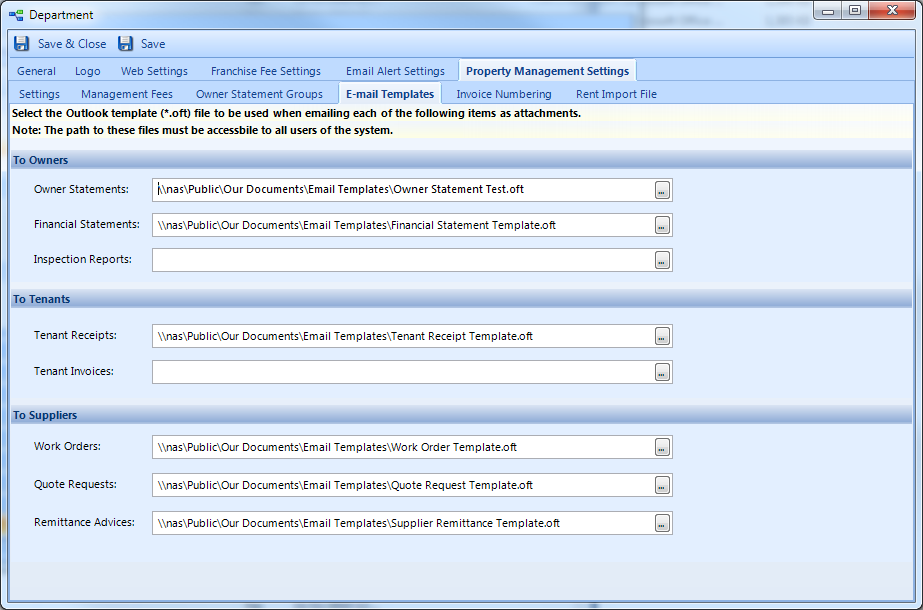
Note: Outlook template paths must be stored on a file server on your local computer network so that all users of the software have access to the file.
Refer to each section below for the complete set of field names available for each type of email.
Owner Statement Email Template Fields
Here is the complete list of field names available ; emailing Owner Statements:
CreationDateTime
DeliveryDateTime
DeliveryEndDate
DeliveryStartDate
DepartmentNotes
NetRentCommissionPercentage
Notes
NumberOfCopies
OtherCommission
OwnerName
OwnerStatementBatchNumber
PaymentDetails
PaymentToOwnerAmount
PeriodFromDate
PeriodToDate
PropertyAddressText
PropertyGroupNumber
PropertyManagerName
RecipientAddressBlock
RecipientContactName
RecipientEmailAddress
RecipientMobilePhone
RecipientNameOnLetters
RentCommission
RentReceived
SmsAlertActive
SmsAlertSent
RecipientNameOnLetters is usually the owner's name, but the recipient is not always the owner so it is best to use RecipientNameOnLetters instead of OwnerName.
Owner Financial Statement Email Template Fields
Emailing Financial Statements uses the set same fields as for Owner Statements.
Tenant Receipt Email Template Fields
Here is the complete list of field names available when emailing Tenant Receipts:
CreationDateTime
Date
Number
Notes
Amount
PostChequeToAddress
AddressText
PayeeName
Cancelled
CancellationDate
DatePresented
PayeeAddress
ChequeNumber
Drawer
AccountName
AccountNumber
BankName
BankBranchName
BSB
ReasonName
PaymentMethodName
WeeklyRentGSTInclusive
RentAmount
InvoicesAmount
BankAgentNumber
BPayNumber
OtherDepositNumber
VacancyDate
RentalReviewDueDate
RentalReviewPeriod
RentalReviewAmount
NormalRentAmount
RentPaymentPeriod
RentalPaymentDayOfMonth
PartialPaymentAmount
PaidToDate
NextRentPeriodStartDate
NextRentChangeDate
NextRentAmount
NextRentPaymentPeriod
NextRentalPaymentDayOfMonth
RentPeriods
RentPeriodStartDate
RentPeriodEndDate
CorrectedPartialPaymentAmount
CorrectedPaidToDate
PaymentPlanStartDate
PaymentPlanEndDate
PaymentPlanAmount
PayerName
RentHoldingDepositBalance
RentDeductionAmount
RentDeductionReason
Tenant Invoice Email Template Fields
Here is the complete list of field names for Tenant Invoices:
Number
DateInvoiced
TotalAmount
GstAmount
AmountAllocated
AmountPaid
LastPaymentDate
AmountDue
DueDate
Notes
Reason
AddressText
OwnerNames
DateLastPaid
WriteOffNotes
InvoicedToName
DebtorName
PostInvoiceToAddress
SupplierServiceTypeID
PeriodFrom
PeriodTo
LastInvoicedDate
RepeatingText
RepeatingFrequency
Work Order Email Template Fields
Here is the complete list of field names for Work Orders:
Number
CostEstimate
AmountCharged
GSTAmount
GSTPayable
GSTInclusive
WorkDetail
CoveredByInsurance
ActualCompletionDate
DateIssued
DateCancelled
OnSiteContactName
CompletionDate
AgreedCompletionDate
OwnerInstructions
AuthorisedByStaffName
SupplierName
Address
UrgentRepairAuthority
MaintenanceNotes
HookNumber
CancelReason
Quote Request Email Template Fields
Here is the complete list of field names for Quote Requests:
Number
JobNumber
QuotedAmount
WorkDetail
DateIssued
DateAccepted
DateCancelled
OnSiteContactName
DueDate
CompletionDate
AgreedCompletionDate
OwnerInstructions
GSTPayable
GSTInclusive
AuthorisedByStaffName
SupplierName
Address
UrgentRepairAuthority
MaintenanceNotes
HookNumber
ServiceTypeName
Supplier Remittance Advice Template Fields
Here is the complete list of field names for Supplier Remittance Advices:
CreationDateTime
Date
Number
Notes
Amount
PostChequeToAddress
PayeeName
Cancelled
CancellationDate
DatePresented
PayeeAddress
Paid
ChequeNumber
Drawer
AccountName
AccountNumber
BankName
BankBranchName
BSB
Staff Payslip Fields
Here is the complete list of field names that can be used when emailing payslips to staff:
AcceptsEmail
AcceptsMail
AcceptsSMS
Acn
ActiveSinceDate
AddressText
Attention
CategoryNames
Code
DateOfBirth
DateStarted
Email
Email2
Fax
ForwardingAddressText
GivenNames
HideFromStaffWebList
HideMobileOnWeb
HomePhone
JobTitle
LetterName
MailMergeName
MobilePhone
MobilePhone2
Name
Notes
PeriodEndDate
PostalAddressText
PreferredName
Surname
TerminationDate
TerminationNotes
Title
UserName
WebDisplayOrder
WebPageAddress
WebProfileNotes
WorkPhone
WorkPhoneExt