 Home
 Back
 Forward
 Print
Setup Options – Image Location
Use this area to setup and define the location of where property images are stored. Note: The Network Image path is set for each department. The Department may be changed by select the relevant Department name from the Task Panel Drop Down list.
To enter the Images Location
1. Click on the Administration button.
2. Under Setup, select the Setup Options option.
3. Click on the
 icon next to Network Image Cache.
4. Browse to the nominated folder on your pc/network.
5. Click on the Save button.
MultiArray does not store high resolution images on its Real Estate Manager Internet server. The reason for this is that websites and e-mail marketing do not require high resolution property photo images; in fact, large image files degrade a website’s performance. Compared to print quality images, which require a resolution of 300 dots per inch (dpi), only 72 dpi is typically needed for a website image. An added advantage of not storing high resolution images on the internet server is for improved performance of the Real Estate Manager desktop application, since exchange of large amounts of binary image data is time consuming over the internet.
The problem that needs to be solved is how to make image information accessible from anywhere to anyone who needs it, while simultaneously ensuring high quality images are available when printing is required.
Referring to the diagram, the MultiArray solution to the image management problem is as follows:
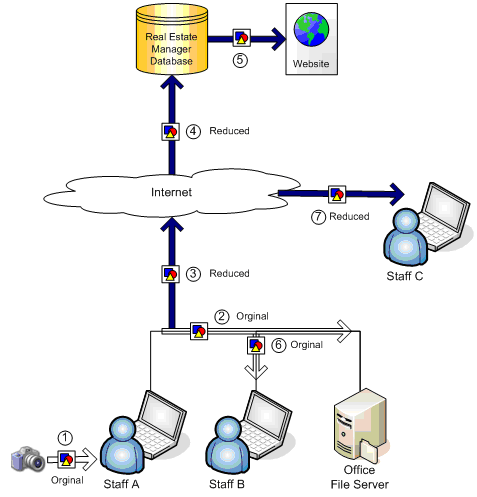
1. Photos are downloaded by “Staff A” direct from the digital camera’s memory into the Real
Estate Manager software, and are saved in association with a property. This image will be in its original, high-resolution format.
2. Before the image is saved, the high-resolution image is copied to a shared network folder on
the office’s file server behind the scenes. The file server is a computer that is accessible to everyone on the network, which typically has shared document information that is regularly backed up.
The image is stored in a known directory structure that is managed and indexed by the Real Estate Manager application. The folder structure should not be changed and files should not be renamed, otherwise Real Estate Manager will not know how to access these files later on.
Note: For a single physical office having multiple departments, the “Network image path” should be set to the same network path in each department. This is recommended, so that people in different departments in the same office can deal with the same property. Otherwise if the image paths were different per department, not all departments would have access to the high-resolution image for printing. This is the case if the departments were in two different physical locations.
3. Before the image is sent to be saved on the internet database, it is reduced to a size that is
optimum for use over the internet, and on websites.
4. The image in its format is persisted into the database along with the property information.
5. The image in its reduced format is ready for use in websites.
6. Staff B is another person in the office who wishes to use a property image in Real Estate
Manager, say to print a brochure for. When he or she runs the brochure report, the high-resolution image that was saved in the known directory structure on the office file server will be accessed. All images used in the application will be retrieved from the file server in the first attempt, guaranteeing the highest quality image combined with fast access. The image is immediately available to be shared by everyone, without it having to be downloaded again from the internet, saving bandwidth usage.
7. Staff C is remote, away from the office but with access to the internet. He or she does not have
access to the file server back in the office. However, images will still be available in Real Estate Manager because they will be downloaded from the internet database when requested.